

An AI chatbot that simply answers questions is no longer impressive; it’s the bare minimum. We have integrated LLMs into everything from schoolwork to enterprise software, but as we push for more complex tasks, we hit a wall: reliability. The “AI hype” is being replaced by a cold, hard requirement: Utility. If you want to build a tool that generates real business value, you need to understand LangChain. It is the framework that turns a static, forgetful model into a living, remembering Agent.
The Mechanics of Intelligence: It’s Not Magic, It’s Orchestration
To understand how LangChain works, we first need to strip away the marketing metaphors (“Brain,” “Thinking”) and look at the engineering reality.
At its core, a standard Large Language Model (LLM) like GPT-4 has two major flaws:
- It is Stateless: It doesn’t “remember” you. Every time you send a message, the model treats it as the very first time it has ever met you.
- It is Isolated: It cannot access your files, the internet, or your database. It is trapped in a frozen box of training data.
LangChain is the Orchestration Layer that solves these two problems. It acts as the “middleware” that connects the raw reasoning power of the LLM to the real world.
1. The “Chain” (The Assembly Line)
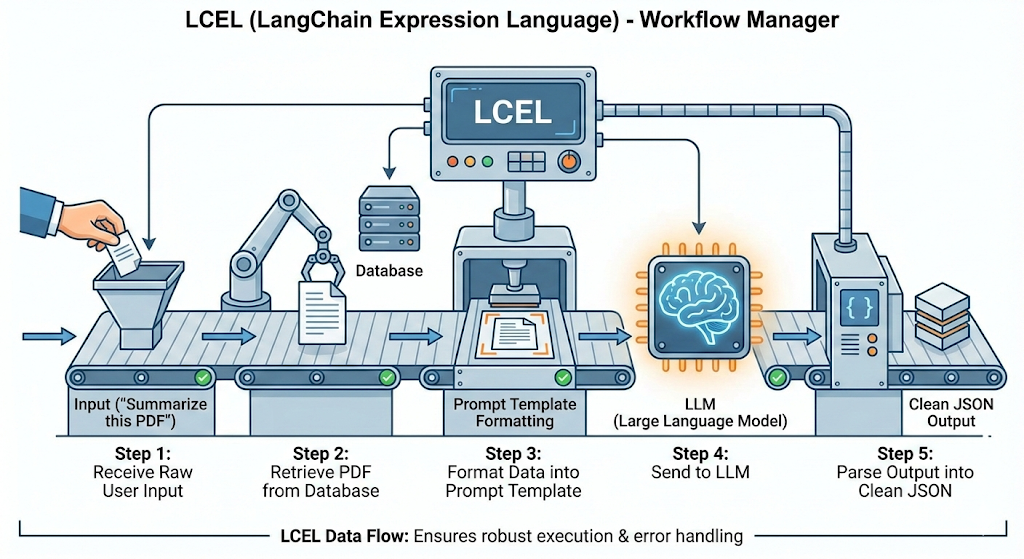
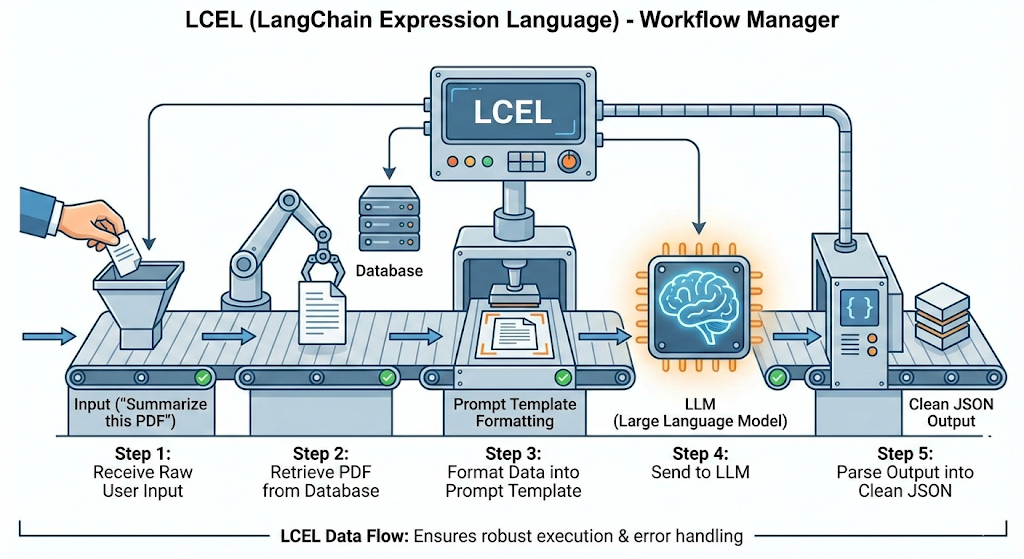
In raw Python, sending a prompt to OpenAI is simple. But building an application requires a sequence of steps. LangChain formalizes this into Chains.
Think of it like a factory assembly line:
- Step 1: Receive raw user input (“Summarize this PDF”).
- Step 2: Retrieve the PDF from a database.
- Step 3: Format the data into a specific Prompt Template.
- Step 4: Send it to the LLM.
- Step 5: Parse the output into clean JSON.
LangChain manages this flow using LCEL (LangChain Expression Language), ensuring that if one step fails, the whole system doesn’t crash.
2. The “Agent” (The Decision Maker)
This is where the shift from “Chatbot” to “Partner” happens. In a standard chain, the workflow is hard-coded (A $\to$ B $\to$ C). But what if the user asks a question you didn’t predict?
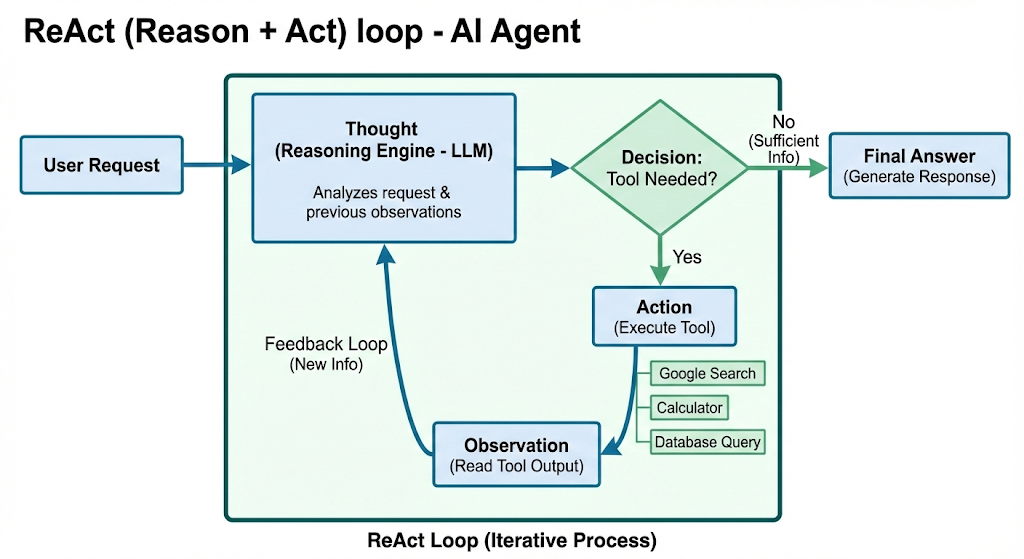
An Agent uses the LLM as a “Reasoning Engine” to decide what to do next. It operates on a loop called ReAct (Reason + Act):
- Thought: The Agent analyzes the user request.
- Decision: It decides which Tool to use (e.g., Google Search, Calculator, Database Query).
- Action: It runs the tool and gets real data.
- Observation: It reads the data and decides if it has enough info to answer or if it needs to run another tool.
This loop is what allows a LangChain application to say, “I don’t know the answer yet, let me check the live flight prices for you,” rather than hallucinating a fake number.
3. The “Memory” (State Management)
Since the LLM is stateless, LangChain artificially creates memory by maintaining a Conversation History. Before sending your new question to the model, LangChain quickly looks back at your previous messages, summarizes them, and injects that context into the new prompt. This gives the illusion of a continuous conversation.
The Core Architecture: LangGraph & LangMem
To build an agent that truly “remembers” over days or weeks, standard linear pipelines aren’t enough. We need a more advanced architecture: LangGraph.
1. LangGraph: The Orchestration Engine
Standard LangChain is built for linear execution. LangGraph is built for cyclic execution. It models your agent as a State Machine.
- The State: A shared data structure (schema) that tracks the conversation. Every node in the graph reads from and writes to this State.
- Nodes: Python functions (e.g., “call_model”, “execute_tool”) that modify the State.
- Edges: The logic that decides which Node to jump to next.
- Checkpointers: The persistence layer. This saves the State to a database (like Postgres), allowing you to “time travel” or resume conversations days later.
2. LangMem: The Memory SDK
This is a specialized library for managing long-term memory. It gives the agent tools to actively manage its own knowledge:
- create_manage_memory_tool(): Allows the agent to write new memories (e.g., “Save fact: User hates meetings on Fridays”).
- create_search_memory_tool(): Allows the agent to query past memories (e.g., “Search: What are the user’s travel preferences?”).
The Three Types of Memory: A Cognitive Architecture
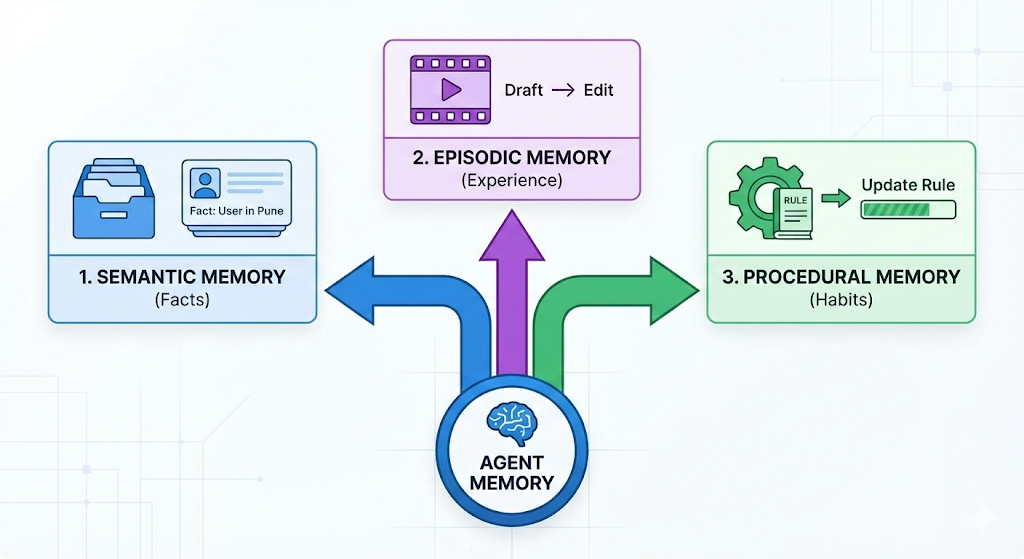
A single vector store is insufficient for a complex agent. To build a robust system, we need a “cognitive architecture” that mimics the human brain, split into three distinct types.
1. Semantic Memory (Facts & Profile)
- Definition: Explicit facts about the user or the world.
- Use Case: The agent learns who the user is.
- Example: If you say, “I’m heading to the Big Data conference in Pune next week,” the agent extracts the triplet (User, Location, Pune) and stores it.
- Retrieval: When drafting a future email, it checks this profile to personalize the context automatically.
2. Episodic Memory (Experience & Examples)
- Definition: Recalling specific past sequences of events. It answers: “Have I seen this situation before?”
- Use Case: Learning from your edits (Few-Shot Prompting).
- Example: You ask the agent to draft an email. It writes “Dear Sir.” You edit it to “Hi.” The system saves this “Episode.”
- Retrieval: Next time, it searches for similar past episodes, sees your correction, and applies the “Hi” pattern before generating the text.
3. Procedural Memory (Instructions & Habits)
- Definition: The “muscle memory” of the agent—the internalization of rules.
- Use Case: Updating the System Prompt.
- Example: You consistently reject emails that use emojis.
- Action: Instead of just storing a fact, the agent runs a “Reflector” step. It analyzes your feedback and rewrites its own core System Prompt to include: “NEVER use emojis in professional emails.”
Case Study: Building the “Evolving” Email Assistant
To demonstrate this, let’s look at how we build an Email Assistant that gets smarter over time.
- Phase 1 (Stateless): A simple router. It reads emails and decides to Ignore or Respond. Deficiency: If you correct it, it forgets immediately.
- Phase 2 (Semantic Memory): We add a “Hot Path.” As the agent reads emails, it saves key facts (e.g., “Project Delta is delayed”) to your profile, allowing it to reference them weeks later.
- Phase 3 (Episodic Memory): We add a “Background Path.” The system indexes your edits. When a new email arrives, it searches your history for similar situations to mimic your writing style.
- Phase 4 (Procedural Memory): We add a “Meta-Optimizer.” If you give negative feedback, the agent rewrites its own instructions to permanently fix the logic bug.
In 2026, we are moving from a world of “tools” to a world of “partners.” Whether you are a student specializing in Big Data or a professional managing a team, LangChain is your bridge to this future.
By focusing on Memory and Utility, you aren’t just building software; you are building an asset that grows more valuable every time it is used.