

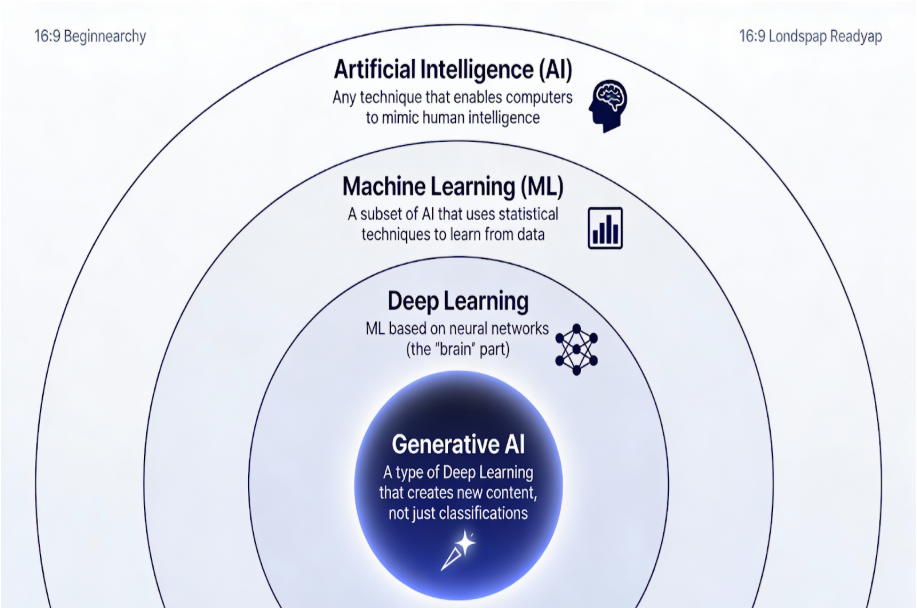
As we are evolving so is the technology ,Gen AI ie. Generative Artificial Intelligence is an AI that is not only based on existing data but it can also create new data in the form of images, audio and texts and it does not stop here new features keep getting updated regularly. As we move forward in 2026 AI is not only limited for the use of tech industry but is getting an integral part in all sectors from engineering to medicine to arts and slowly becoming a daily essential in our daily life, there is not one day now that goes without using
AI for people working in offices , students in schools and colleges so mastering it is beneficial for us in the coming future because everyone is using AI right now its in our hands if we just want to be an average user or stand out and use it in our advantage. We have moved past the era of simple automation and entered the era of Generative Artificial Intelligence (GenAI). Unlike traditional AI, which was designed to analyze data and make predictions (like Netflix recommending a movie), GenAI is creative. It generates new data images that have never been seen, music that hasn’t been composed, and code that hasn’t been written. GenAI has evolved beyond simple chatbots.
We are now in the age of Agentic AI, where AI models don’t just give you an answer; they perform actions. They can research a topic, cross-reference sources, draft a report, and even manage your project timelines. For students in schools and colleges, mastering these tools isn’t just a “bonus” skill, it’s an essential requirement.
Table of Contents
ToggleWhat Basic AI Skills Should You Learn?
Gen AI is different from traditional AI as it uses ‘Neural Networks’ which mimics the way the human brain works. It has very complex algorithms to give predicted output or generate new content by recognizing patterns of old data. Here are five main things useful for building skills in Gen AI.
1. Programming Basics (Python)
Python is the most dominating programming language in the AI world. While you don’t need to be a pro developer, having basic knowledge of Python will help you write your own automation scripts and give you insight into how existing AI frameworks operate. In 2026, knowing how to use AI coding assistants (like GitHub Copilot) to help you write Python is actually considered a skill in itself.
- Why Python? It’s readable, has a massive community, and contains libraries (pre-written code) that do the heavy lifting for AI.
- The AI Twist: You no longer need to memorize every syntax rule. With AI Coding Assistants like GitHub Copilot, you can describe what you want in English, and the AI will draft the Python code for you. Your job is to read, verify, and “debug” the logic.
2. Data Manipulation
AI has no real thoughts; it is fueled by the data you give it. If your input is messy or biased, your output will be mediocre. This is often called GIGO (Garbage In, Garbage Out). Pandas & NumPy: These are the essential Python libraries for data. Pandas allows you to treat data like a super-powered Excel sheet, while NumPy handles the complex math behind the scenes. Knowing how to handle and preprocess data is crucial for any project. Learn to work with libraries like Pandas and NumPy . Even if you have no technical background, understanding how data is structured helps you give AI better “context” when you ask it to analyze a report or a dataset.
3. Understanding AI Concepts
First thing you should get started with the fundamentals. Understand the meaning of terms like machine learning , Neural Networks (the “brain” of the AI), and deep learning. In 2026, there is going to be a rise in LLMs (Large Language Models) and AI Agents tools that don’t just give outputs or chat, but can actually execute tasks like browsing the web or managing files. Knowing these concepts will help you grasp how AI tools work and, more importantly, where they might fail.
- Machine Learning (ML): The process where a computer learns patterns from data without being explicitly programmed.
- Large Language Models (LLMs): The specific type of AI (like Gemini or GPT) trained on billions of words to understand and generate human language.
- Multimodal AI: This is the ability of an AI to process and understand different types of information like text, images, video, and audio all at once. It allows for seamless transitions between formats, such as taking an audio input (like a voice command) and providing a text output (like a written summary).
- AI Agents: The 2026 standard. These are AI systems that can use tools like browsing a browser or writing to a file to finish a complex goal you set for them.
4. AI Frameworks
Familiarize yourself with leading AI platforms and frameworks; it consists of datasets, libraries , packages and tools . While developers look at TensorFlow or PyTorch, most students in 2026 should focus on API integration and multimodal tools. API Integration: Learning how to connect one AI’s brain to another. For example, using an AI to find information (Perplexity), another to summarize it (Gemini), and a third to turn that summary into a presentation (Gamma).
This “Multimodal” approach is the hallmark of a high-level user. AI Frameworks have shifted from building single models to orchestrating “Multi-Agent Systems” through protocols like MCP (Model Context Protocol), which acts as a universal connector between different AI brains and your personal data. High-level users utilize Orchestration Frameworks like LangGraph or CrewAI to link specialized tools together allowing the AI to self-correct and execute complex, multimodal workflows across different media types autonomously.
- Critical Thinking and Ethics
This is perhaps the most important skill. Understanding the ethical consequences of AI such as bias (AI reflecting human prejudices) , privacy (where does your data go when you upload it?) , and deepfakes is essential for responsible use. Developing critical thinking allows you to spot “hallucinations” (when an AI confidently provides factually wrong answers) and ensures you are using these tools to augment your brain, not replace it.
How to Start Learning from Scratch
Starting your AI journey can feel like standing at the base of a mountain, but the path is well-paved with free resources. Here is exactly where to go.
Free Courses
There are various platforms offering free AI courses that you can take advantage of today:
- Coursera: Look for the “AI for Everyone” or “Generative AI for Everyone” courses by Andrew Ng. These are designed specifically for beginners. Pro Tip: You can “Audit” almost any course on Coursera to watch the videos and read the materials for no cost. You won’t get a certificate for it but the same knowledge .
- Google Cloud Skills Boost: Google offers a dedicated “Generative AI Learning Path” that covers the basics of LLMs, responsible AI, and image generation. It’s entirely free and highly interactive.
- Microsoft Learn: Their “Azure AI Fundamentals” path is a fantastic way to learn about the cloud-side of AI. It includes hands-on labs where you can see AI models in action.
- Kaggle: This platform offers hands-on tutorials on machine learning, plus many free datasets you can practice with. It’s the best place to move from theory to actual practice.
Certifications
While many skills can be learned for free, earning certifications can enhance your resume
- Microsoft AI 900: This is a professional grade certification. Microsoft often hosts “Virtual Training Days” where students who attend can receive a voucher to take the certification exam for free.
- Google AI Essentials: Available on Coursera, this certificate is specifically aimed at students and workers looking to prove they can use AI to speed up daily tasks.
Step by Step Guide to Practice Generative AI for FREE
To practically learn, you need the “Pro” tools. In 2026, major tech companies offer generous student discounts and trials. Here is how to claim your 2026 student tech stack:
Claim Google AI Pro (Gemini 3 Pro)
Google currently offers a 12-month free trial for verified students.
- Go to the Google One for Students page.
- Sign up using your university email.
- Verify your status through SheerID (instant verification with your ID).
- The Benefit: You get Gemini 3 Pro (advanced reasoning), 2TB of storage, and AI integrated into Google Docs and Slides for an entire year.
Gemini 3 Pro – Google DeepMind
Unlock Azure for Students
Microsoft provides a cloud sandbox for you to build your own AI apps.
- Visit Azure for Students and click “Start Free.”
- Log in with your school email no credit card required.
- The Benefit: You get $100 in credits to use on Azure OpenAI services to build your own chatbots or projects.
Azure for Students – Free Account Credit | Microsoft Azure
Get the GitHub Student Developer Pack
If you want to master the “Programming Basics” we mentioned earlier, this is essential.
- Apply at GitHub Education with your school ID.
- The Benefit: You get GitHub Copilot (the AI coding assistant) for free. It’s like having a pro programmer sitting next to you, explaining every line of code you write.
GitHub Student Developer Pack – GitHub Education
Places to Explore & Practice
Once you have your tools and your courses, it’s time to get your hands dirty.
Hugging Face: The AI Hub
Hugging Face – The AI community building the future. If you want to see where the “open” in open-source AI happens, this is it. Hugging Face is a central platform where researchers and developers share their models, datasets, and demo apps.
The Model Hub: Access over a million pre-trained models (like Llama, Stable Diffusion, or BERT) that you can download and use for free.
Spaces: This is a playground where you can try out AI apps built by others like image generators or chatbots directly in your browser without writing any code.
The Courses: They offer high-quality, free tutorials on Natural Language Processing (NLP), Diffusion models (for images), and Reinforcement Learning to help you move from a beginner to a pro.
Online Communities
Join online communities such as GitHub, Reddit (r/Generative AI), or AI-focused Discord servers. In 2026, these are the “tech hubs” of the internet. Interacting with other students, seeking advice on a prompt that isn’t working, and collaborating on open-source projects can accelerate your learning by months.
AI Competitions & Hackathons
Consider participating in AI competitions like Kaggle contests. These challenges not only help you learn but also provide a platform to showcase and practice your skills to future employers. Even if you don’t win, the code you write goes straight into your portfolio.
Local Tech Hubs
For hands-on experience, visit local makerspaces, university tech hubs, or coworking spaces. Many of these places host weekend AI Hackathons where you can join a team and build a functional AI app in 48 hours.
Happy learning!