

For all their intelligence, Large Language Models (LLMs) like Claude, GPT-4, or Gemini have been living in isolation. They are trapped in their own interfaces (the “chat box”).
- Data Isolation: Your most valuable data lives in specific tools Slack for communication, GitHub for code, Google Drive for documents, and SQL databases for customer records.
- The Context Gap: The AI knows everything about the public internet (up to its training cutoff), but it knows absolutely nothing about you. It doesn’t know what you were working on yesterday or what bug appeared in your code five minutes ago.
If we made changes in the backend in API the AI was unable to fetch answers so we needed a framework who can keep all these details updated to let us know about the modifications done.Thus MCP came into picture.
What Was Used Before?
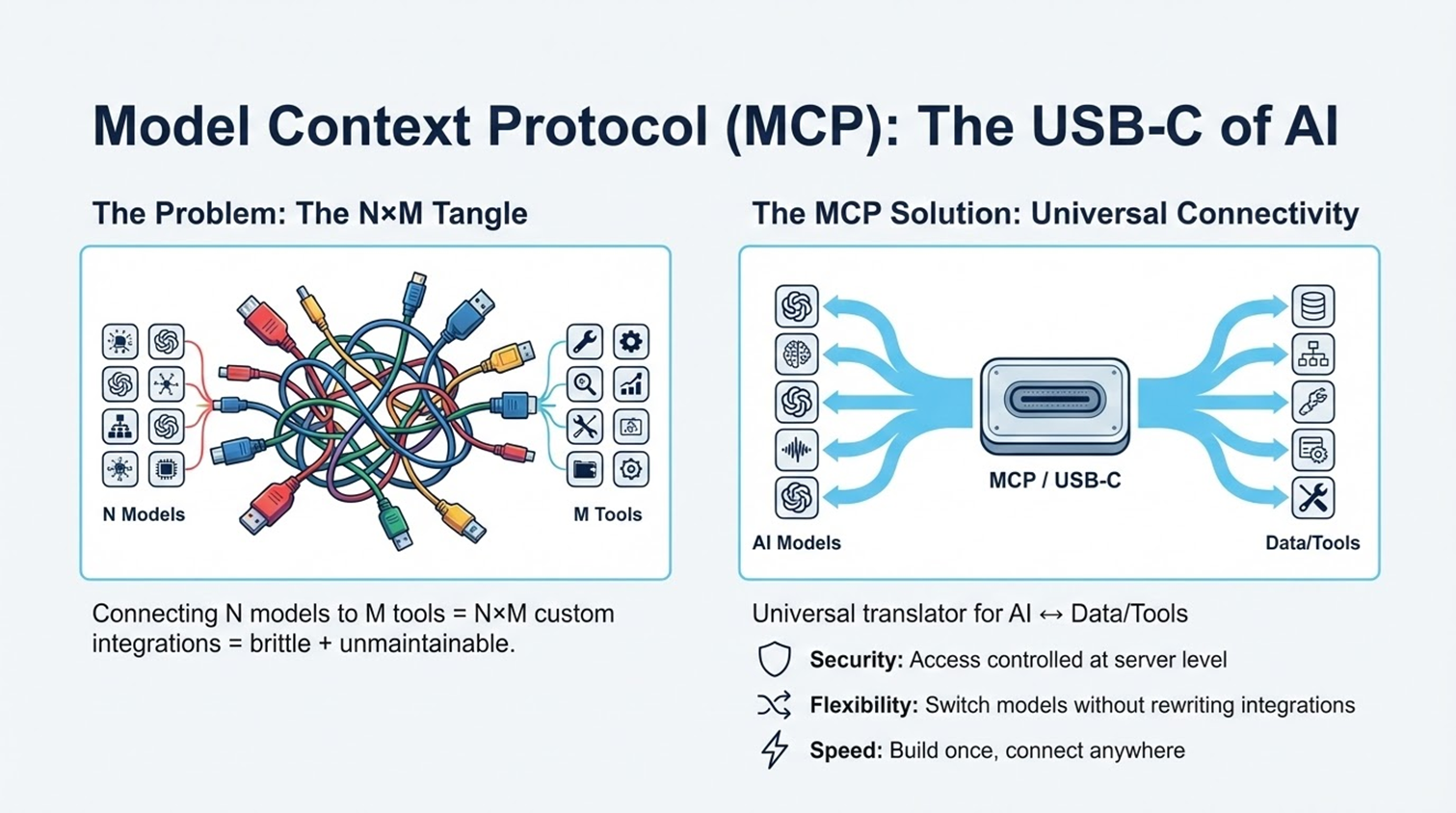
Before MCP, connecting AI was a manual and messy ordeal. Users were stuck with the primitive “copy-paste” method, while developers faced the “M × N Nightmare.” They had to write custom, fragile “glue code” for every single combination of AI model and data source. It resulted in an unscalable tangle of integrations that broke constantly and were impossible to maintain.
What is MCP?
MCP (Model Context Protocol) is an open standard that allows AI applications to connect to data sources and tools.
Think of it as a Universal Translator. It sits between the AI and your tools. The AI speaks “MCP,” and the Tool speaks “MCP.” Because they now share a common language, they can understand each other perfectly without custom translation layers.
Where All Is It Used?
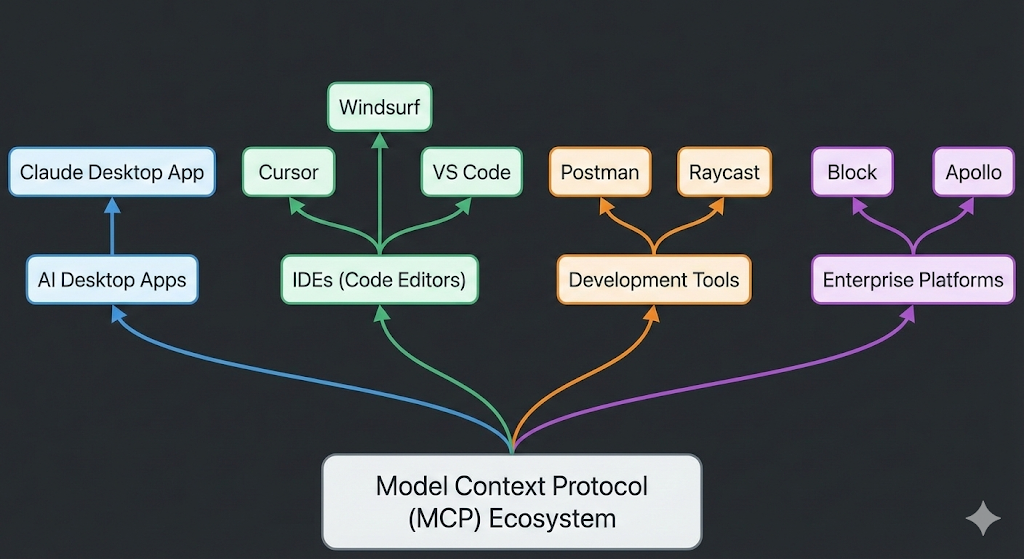
MCP is rapidly being adopted across the developer ecosystem:
Developers: To build custom tools for their workflows.
Enterprises: To securely connect their internal knowledge bases to AI agents.
Power Users: Tech-savvy individuals using tools like Raycast or Claude Desktop to automate their daily tasks.
Importance & Characteristics
Importance: It effectively supports AI integration. It turns AI from a passive chatbot into an active AI agent that has access to your company’s filing cabinet.
Key Characteristics:
- Open Standard: It is not owned by one single AI company (though Anthropic open-sourced it, it is free for all).
- Secure: It respects permissions (the AI can’t read what you don’t let it).
- Local & Remote: It can connect to files on your laptop (local) or a server in the cloud (remote).
How Does It Work?
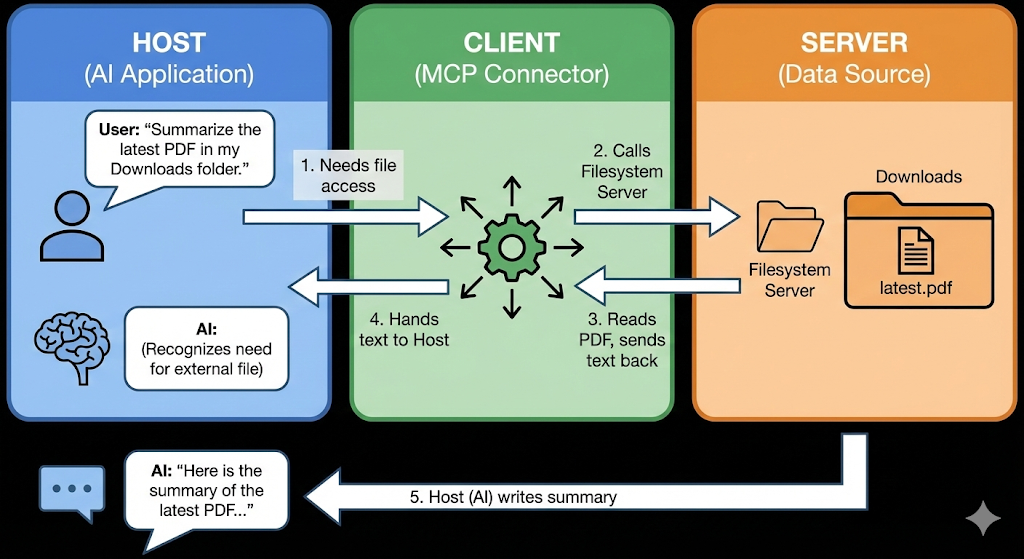
MCP uses a Client-Host-Server architecture. Let’s break it down using a restaurant analogy:
- The Host (The Waiter): This is the AI application you interact with (e.g., Claude Desktop). It manages the conversation.
- The Client (The Order Pad): This is the connector inside the app that knows how to write down your request in a standard format.
- The Server (The Kitchen): This is a small program connected to your data (e.g., a “Google Drive MCP Server”). It knows how to “cook” (fetch/process) the data.
The Workflow:
- You ask the AI: “Summarize the latest PDF in my Downloads folder.”
- The Host sees it needs a file and asks the Client to help.
- The Client calls the Server (Filesystem Server).
- The Server reads the PDF and hands the text back to the Client.
- The Host (AI) reads the text and writes the summary for you.
Real-World Use Cases
- Coding: An AI in your code editor uses MCP to read your error logs, check your GitHub repo, and suggest a fix—all without you pasting any code.
- Business Intelligence: A manager asks an AI, “What were our sales last week?” The AI uses a “Postgres MCP Server” to safely query the database and generate a chart.
- Personal Productivity: You ask, “Am I free at 2 PM?” The AI uses a “Google Calendar MCP Server” to check your schedule.
Advantages
- Write Once, Run Anywhere: Developers build a “Slack MCP Server” once, and it works immediately with Claude, Cursor, and any future MCP-compliant AI.
- Security: Users keep control. You authorize specific servers. The AI doesn’t just get blanket access to your entire computer.
- Modularity: You can “swap out” tools easily. If you switch from Linear to Jira, you just swap the MCP server; the AI workflow remains the same.
How It Acts & What It Can’t Do
How it acts: It acts as a bridge. It does not “store” your data; it just creates a tunnel for the AI to fetch it when you ask. It is passive until triggered by a user’s prompt.
What it CAN’T do :
- It isn’t a brain: MCP is just a pipe. If the underlying AI model is “dumb,” MCP won’t make it smarter; it just gives it more data.
- No Magic Auth: You still need to log in to your tools. MCP handles the connection, but it can’t bypass your company’s login screens or firewalls.
- Not a Replacement for RAG: For massive datasets (like terabytes of documents), you still need RAG (Retrieval Augmented Generation). MCP connects to the source, but RAG is often better for searching the source efficiently.
Where Is It Headed?
- Remote Servers: Currently, many MCP servers run locally on your computer. The future is “Remote MCP,” where cloud services (like Salesforce or Jira) host their own official MCP endpoints.
- Universal Adoption: We are moving toward a world where every software product (from Excel to Spotify) ships with an “MCP Server” out of the box, making them instantly AI-compatible.
In short, Model Context Protocol is used to break down the walls between Intelligence (AI models) and Information (your data). It allows AI to leave the chat box and actually interact with the digital world to solve real problems.